Showing posts with label Technology. Show all posts

Thursday, 11 August 2016

My First PC Build

This is the first gaming and work PC I've built.


I haven't really built a PC other than in 2002 when I bought a pre assembled motherboard, CPU (I think it was an Athlon XP 1.2GHz) and fan and then went and installed the other parts like a case and hard drive.

The full list parts I used to build this PC is available on PCPartPicker but here is what I went for:

Type Item
CPU Intel Core i7-6700K 4.0GHz Quad-Core Processor
CPU Cooler Corsair H100i v2 70.7 CFM Liquid CPU Cooler
Motherboard Asus MAXIMUS VIII HERO ATX LGA1151 Motherboard
Memory Corsair Vengeance LPX 16GB (2 x 8GB) DDR4-3600 Memory
Storage Sandisk Ultra II 480GB 2.5" Solid State Drive
Storage Samsung 950 PRO 512GB M.2-2280 Solid State Drive
Storage Western Digital Caviar Green 1.5TB 3.5" 5400RPM Internal Hard Drive
Storage Western Digital Caviar Green 3TB 3.5" 5400RPM Internal Hard Drive
Video Card Asus GeForce GTX 1070 8GB Video Card
Case Fractal Design Define R5 (Black) ATX Mid Tower Case
Power Supply EVGA 850W 80+ Gold Certified Fully-Modular ATX Power Supply
Operating System Microsoft Windows 10 Pro OEM 64-bit
Case Fan Noctua NF-A14 industrialPPC-2000 PWM 107.4 CFM 140mm Fan
Case Fan Fractal Design GP14-WT 68.4 CFM 140mm Fan
Monitor Apple LED Cinema 27.0" Monitor
Keyboard Ducky ONE Wired Standard Keyboard
Mouse Zowie FK1 Wired Optical Mouse
Headphones Sennheiser HD 202 II Headphones
Other Asus Thunderbolt 2 Ports PCI Card for Z87/Z97 Deluxe


I've always wanted a gaming PC but never had one. Until recently I've played most of my games on consoles but after hearing about Microsoft's Play Anywhere initiative, having already bought loads of games through services like Humble Bundle (I'd buy them planning on getting a PC someday) and wanting to play more games at 60 frames per second I decided to just go for it and build a PC.


Since 2006 I've been mostly a Mac user and I already had a 27" Apple Thunderbolt display so I wanted to keep using that but as the display is Thunderbolt only I had to get a PCIe card that would take a DisplayPort input from a graphics card and send it out via Thunderbolt 2. So I picked up the Asus Thunderbolt 2 Ports PCI Card and selected a matching ASUS motherboard with a Thunderbolt header on it (this didn't work at first and I had to plug my PC into my TV via HDMI and change some BIOS setting to allow Thunderbolt to be on when the PC starts). The Apple display has built in speakers which are OK but I thought I would just use my everyday Sennheiser HD 202 II headphones when gaming.

I also had several old Western Digital Green hard drives that were used inside a Drobo before they were replaced (with larger Western Digital Red hard drives) so I wanted to reuse them for mass local media storage.

The last thing I had laying around was a 480GB SSD I used to use as an external drive for the Xbox One. I'd hardly used the SSD but ended up replacing it with a 960GB SSD so it was just sitting in cupboard.

Once I got all the parts putting it together was pretty easy, everything pretty much snapped into place.


My Windows install is on the Samsung 950 Pro M.2 SSD and the M.2 slot is set to PCIe mode so it's really fast! Booting up takes a few seconds (after all the P.O.S.T stuff). The two Sandisk Ultra II SSDs are in RAID 0 (giving me one 960GB drive in Windows) and hold all my games. The two Western Digital Green 3TB hard drives are in RAID 1 (giving me one 3TB drive in Windows) and is used for local media and document storage. The spare 1.5TB Western Digital Green drive is plugged in to the slower SATA 2 drive and is currently used to hold back ups.

I'm really happy with going for a GTX 1070 as I can play pretty much all my games at 60 frames per second at 1440p on medium to high settings.

Sunday, 14 December 2008

Playing With PlayTV

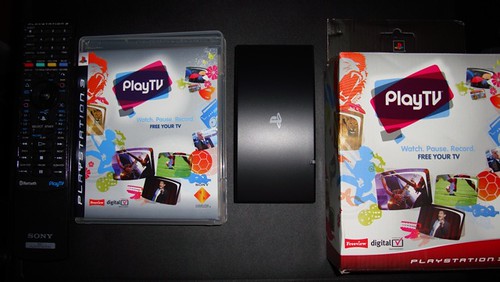
I have had a PlayTV attached to my PS3 to turn my games console into a Freeview PVR for a few months now and after wanting to write about it for months I thought I would finally get around to it.

Play TV - 1

I bought the PlayTV to replace my existing Sagem Freeview box, which was getting a bit old and using my PS3's existing hard drive the PlayTV would allow me to record TV.

Setting up the PlayTV is very simple all I needed to do was plug in my existing coaxial cable into the PlayTV and then plug that into the PS3 via one of the spare USB ports on the front, however the USB cable sticking out the front is a bit noticeable. The kit also came with a sticker to stick on my existing PS3 remote so it would label what the buttons on the remote would do with PlayTV. Once I turned my PS3 on I just popped in the supplied DVD and the software installed within a few minutes.

Once the software has installed the PlayTV shows up in the Playstation 3's XMB in between the Video and Game options. When you go into the PlayTV the menu system is easy enough to navigate and reminds me of Apple's old Front Row interface with options appearing in a circular shape.

You get a weeks worth of TV listings in the guide and as far as recording features there's nothing amazing but you record and pause live TV as well as setting up scheduled recordings.

Navigating through you recordings isn't too difficult as they are just in a list format and you can change the sort order to help you find what your looking for.

The picture quality is good and on a par with some stand alone PVRs. However the picture does freeze for a second every now and again, but this is somewhat rare.

When I first got the PlayTV I did notice a few issues such as the guide taking a few minutes to load however this seems to have been fixed in a software update.

My PS3 came with a 60GB hard drive which due to the amount of programs I recorded filled up very quickly and instead of just deleting some of the programs I had watched I choose to replace my PS3's hard drive with a larger 500GB hard drive. Replacing the hard drive wasn't too difficult after watching a few clips on YouTube on how to replace my PS3's hard drive and only took a few minutes to swap out the drives (however it took over an hour to back up my data and over another hour to restore my data on my new hard drive).

Thursday, 4 October 2007

FOWA and Diggnation

Yesterday I visited the Future of Web App (FOWA) Expo and the live taping of Diggnation in London's ExCel.


All in all it was a very good day (even though I went by myself).

The expo floor was a little dull and there wasn't much to see although Adobe had a really nice booth setup though where they were showing off some of their products like Flex and handing out free beers and letting people play the Wii.


Microsoft also had setup a few Xbox 360's all with Halo 3 running.

I got to the Expo in the afternoon so I missed the first few speakers but the afternoon speakers on the developers stage were really good. Daniel Burka of Digg.com and Pownce gave a lot of good information on how to listen to users and take in user feedback. Matt Mullenweg of Wordpress.com spoke in great detail about the architure and setup behind Wordpress.com. Matthew Haughley of MetaFilter presentation was on building a community and he made some good points on how to build a community, support a community and how to react when your community does not like something. Heidi Pollock formerly of Yahoo! Mobile and currently part of BluePulse gave an informative presentation on how to create mobile websites, the restrictions and frustrations on creating websites for mobiles and how to cater for the thousands and thousands of different mobile handsets. John Resig of Mozilla (and the lead developer of the JQuery JavaScript Library) spoke about the future of JavaScript and all the cool stuff they are looking to integrate into the Firefox browser. The last presentation I saw was from Kevin Rose of Digg.com, Revision3.com and Pownce, he spoke about how he setup three startup companies in three years and the pitfalls he had along the way.


If there is a lineup of speakers as good as this next year (and if it's in the UK) I will defiantly go again.

After the FOWA Expo was the live taping of Diggnation. Diggnation was so much fun and it was really funny. I tried to take a few pictures but the all came out blurry (mainly because I kept on laughing when trying to take a picture) I really can't say much more other than it really was a great show and I hope they come back to London and do another live show soon.


While I was in London I also took a picture of the Dome/o2 (or whatever it's called these days).

Saturday, 9 June 2007

Won't Someone Please Think Of The Panels!

I was walking through the electrical section in Tesco yesterday and the more I walked around looking at their TV's and Hi-Fi equipment I could not help but think that none of the LCDs and Plasmas were setup they all looked to have been taken out of the box and plunked onto the shelves.

I have noticed this in a lot of electrical retail stores and for some reason this sort of makes me a little upset as it only takes around 10 minutes to do a few basic optimisations and tweaks and this generally makes the panels look better.

Saturday, 2 December 2006

360 HD DVD

After a few months of collecting HD DVD discs I finally got my 360 HD DVD add-on drive for my Xbox 360 (last Thursday).


The picture is great. Contrary to what some think I didn't watch any special HD "movies", the first film I watched was Batman Begins and some of the scenes looked stunning.

Since watching Batman Begins I have watched Serenity and I have got a few more films to watch over this weekend.


I know a few people have reported that films like Batman Begins had sound sync problems but I have not yet noticed any problems like that myself with my setup.

I pre-ordered this item in several places to make sure I got one as soon as possible. Sadly 2 of my orders were posted around the same time so now I have two! Does anyone out there want to buy a 360 HD DVD add-on?